
Mico – Widget & Live Wallpaper
How to install Mico - Widget & Live Wallpaper Mod APK?
1. Tap the downloaded Mico - Widget & Live Wallpaper Mod APK file.
2. Touch install.
3. Follow the steps on the screen.
Note: Important!
- Delete all previous Original/Mod before installing the latest mod.
- If necessary, log in with your email/social media. Modded App cannot be logged in with Gmail.
- Enjoy !!!
Description
Mico turns your phone into a design canvas. You can combine couple and battery widgets, 4K live wallpapers, and more than 1,000 customization tools to create a home screen that looks and works exactly the way you want. Mico helps you design a fully personalized aesthetic setup—layouts, widgets, icons, and wallpapers—so your screen doesn’t look like anyone else’s.
Why 10M+ Users Pick Mico
Mico gives you a large library of ready-to-use designs and the tools to create your own. You can decorate fast with one-tap styles, or you can build everything from scratch for a truly unique result.
1,000+ Creative Widgets
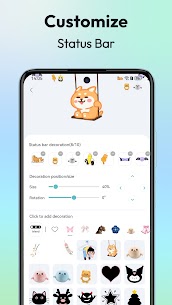
Mico offers widgets that look good and add real function. You can add photo frames, information panels, cute battery displays, music players, home-screen audio widgets, animated elements, and more. The app includes “widget builder” style tools that let you turn your favorite images and ideas into widgets, plus designer-made “top widgets” and theme packs that keep your setup consistent. You can also use photo widgets with different frame styles, including pets, retro game looks, and film-inspired layouts.
4K Live Wallpaper Maker
Mico lets you create and apply crisp 4K live wallpapers. You can turn photos into wallpapers, set video wallpapers (from scenery to your favorite clips), and browse daily-updated collections like anime, manga, landscapes, and abstract art. Mico also applies AI-powered filters and depth effects for portrait wallpapers. If you like automation, you can enable focus-style matching that switches wallpapers by time or location.
Lock Screen Customization
Mico brings extra personality to the lock screen. You can use dynamic widgets such as couple widgets for you and your partner, and matching battery widgets for a coordinated look. You can also design text with editable typography and choose from hundreds of motivational quotes. If you track activity, you can add health-style dashboards with real-time step counters.
Pro-Level Customization Tools
Mico includes advanced tools for creators who want full control. You can convert photos or GIFs into live widgets, apply one-tap layout presets (such as social, gaming, or kawaii styles), and choose from 2,000+ icon packs—ranging from retro pixel to neon glow and marble textures.
Quick Setup and Cross-Platform Sync
Mico speeds up customization with one-tap themes and streamlined controls. It also supports cross-platform style transfer, so you can move an iOS-style look to Android (and vice versa) and keep your setup consistent across devices.
Make Your Device Look Like Yours
If you want one app to theme your phone, build widgets, and create live wallpapers, Mico gives you the toolkit to design a home screen that feels personal and polished. Download Mico and start building your unique “iScreen.”
What's new
Optimize the user experience
Images



Download links
How to install Mico - Widget & Live Wallpaper Mod APK?
1. Tap the downloaded Mico - Widget & Live Wallpaper Mod APK file.
2. Touch install.
3. Follow the steps on the screen.
Note: Important!
- Delete all previous Original/Mod before installing the latest mod.
- If necessary, log in with your email/social media. Modded App cannot be logged in with Gmail.
- Enjoy !!!
Related apps



Most viewed apps
Most rated apps


