
Money Pro

Description

Money Pro helps you take control of your money by turning your paycheck into a clear plan. You can create a monthly budget or choose weekly, bi-weekly, or fully custom periods to match how you get paid. When you budget consistently, you stop impulse spending from draining small amounts every day, and you redirect those dollars toward real financial goals. Money Pro fits home and personal finance needs, and it works well whether you manage a simple allowance or a full household budget.
Build a Budget That Actually Works
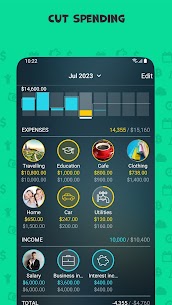
You build a reliable budget by tracking your spending for at least one month. Assign each expense to the right category as you log it. At the end of the month, you can see exactly where your money went and set realistic limits for each category. This approach makes your next budget based on facts, not guesses.
Track Income and Expenses with Flexible Categories
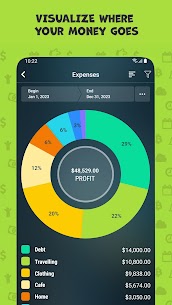
Money Pro lets you decide how detailed your tracking becomes. You can start with the app’s preset expense categories or create your own custom structure. The app supports subcategories, so you can record spending with more precision (for example, “Food” → “Groceries” and “Restaurants”). You can also use filters to analyze patterns and pinpoint the categories that quietly consume your budget.
Share Tracking Across Devices and Family Members
You can track expenses across iOS, Android, Mac, and Windows, and you can coordinate spending with family members when you use the PLUS subscription. This setup helps households stay aligned and reduces the “missing transaction” problem that ruins budgets.
Plan Bills and Recurring Payments
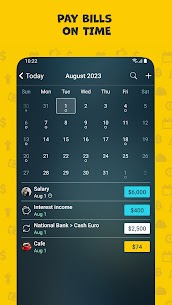
Money Pro simplifies bill management by letting you schedule recurring bills with custom timing. You can set reminders, keep upcoming payments visible, and use quick actions (such as swiping on a record) to manage items faster. Regular bill planning reduces late fees and helps you forecast cash flow for the weeks ahead.
Monitor Every Wallet and Account in One Place
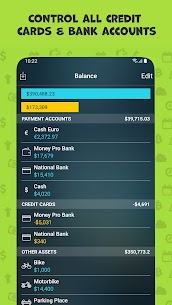
Money Pro works as a full wallet tracker, so you can manage cash, credit cards, bank accounts, and even cryptocurrency assets in one system. You can replace manual checkbook-style tracking with a unified view that shows balances and spending history side by side.
- If you want automation, you can connect online banking and sync accounts (GOLD subscription required).
- If you prefer manual control, you can import financial data using CSV or OFX files.
Track Net Worth: Assets, Debts, and Progress Over Time
Money Pro goes beyond daily expenses by helping you measure net worth. You can list assets such as your home, car, and other valuable property, then record liabilities such as mortgages and credit card debt. You can update asset values as they rise or fall, and the Net Worth report shows how your financial position changes over time.
Analytics and Reports for Smarter Decisions
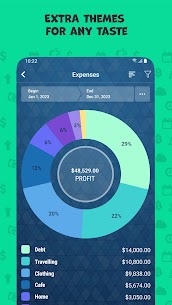
Money Pro gives you visual reports that summarize spending, balances, and trends. You can filter results to drill into specific categories, time periods, or accounts. Projected balance and cash flow reports help you plan ahead instead of reacting after money runs short.
Goals That Keep You Motivated
You can set savings or payoff goals, track progress, and stay focused on outcomes such as emergency funds, travel, debt reduction, or major purchases. Clear goals make budgeting feel purposeful, not restrictive.
Augmented Reality Reports (Optional)
With the GOLD subscription, Money Pro unlocks AR reports that place 3D charts on your table through your camera view. This feature helps you explore spending and trends in a more interactive format.
Extra Tools That Save Time Every Day
Money Pro includes practical tools that make tracking easier and more accurate:
- Split transactions across multiple categories
- Search by amount, category, description, payee, cheque number, and more
- Calendar-based scheduling for planned expenses
- Category system with 1,500+ built-in icons
- Carry over leftover budget amounts to the next period to control spending
- Reconcile transactions to confirm balances
- Home screen widget for fast expense entry
- Multiple profiles for separate personal and family finances
- Receipt attachments for documentation
- Built-in calculator and currency converter
- Export reports to PDF and CSV
- Multi-currency support
- Daily reminders to build a consistent tracking habit
Images
Download links
How to install Money Pro Mod APK?
1. Tap the downloaded Money Pro Mod APK file.
2. Touch install.
3. Follow the steps on the screen.
Note: Important!
- Delete all previous Original/Mod before installing the latest mod.
- If necessary, log in with your email/social media. Modded App cannot be logged in with Gmail.
- Enjoy !!!
Related apps




Most viewed apps
Most rated apps


