
NetMonster
How to install NetMonster Mod APK?
1. Tap the downloaded NetMonster Mod APK file.
2. Touch install.
3. Follow the steps on the screen.
Note: Important!
- Delete all previous Original/Mod before installing the latest mod.
- If necessary, log in with your email/social media. Modded App cannot be logged in with Gmail.
- Enjoy !!!
Description
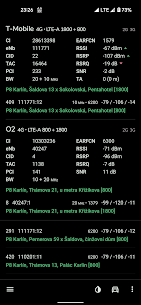
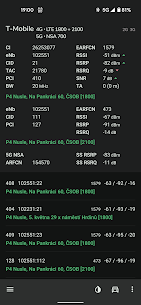
NetMonster gathers, displays, and saves detailed information about nearby cell towers. Every tower uses its own identifiers, and the app shows these values clearly so you can understand what your phone detects. In some countries and regions, NetMonster can also provide precise tower locations.
Continuous Logging of Connected Cells
NetMonster automatically records all cell sites your phone actively connects to. It keeps saving them into a log until you close the app. You can later review the history to see where and when your device switched towers.
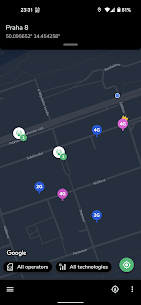
Map View, Location Corrections, Filters, and Export
NetMonster lets you manage collected data instead of just viewing it. You can:
- Manually adjust a tower’s location when you know a more accurate position
- Browse logged cells on a map
- Filter entries to focus on specific towers or network types
- Export your dataset for further analysis or sharing
Signal Visualization and Measurement Explanations
NetMonster tracks signal changes and presents them visually so you can spot fluctuations over time. The app also explains what each measurement means and how it influences reception quality or the theoretical maximum speed you can achieve.
Supported Technologies (2G to 5G) and Advanced LTE/5G Details
NetMonster supports a wide range of mobile networks: GSM, CDMA, WCDMA, TD‑SCDMA, 4G LTE, 5G NSA, and 5G SA. For LTE, it can detect carrier aggregation (LTE‑Advanced). In areas with 5G NSA, you can see whether your phone actually uses NSA or if the network only has it deployed. The app also identifies 4G + 5G NSA aggregation when available.
What's new
⚡️ Drastic (!!!*) change in how you control the app—you'll either love it or hate it!
🤖 Added latest Android 16 features
✨ False-positive PSC and PCI changes detection
✨ Total bandwidth display if your phone supports cell-specific breakdown
✨ New PSC/PCI detection — now values are now yellow instead of red
* more exclamation marks available upon request
Images


Download links
How to install NetMonster Mod APK?
1. Tap the downloaded NetMonster Mod APK file.
2. Touch install.
3. Follow the steps on the screen.
Note: Important!
- Delete all previous Original/Mod before installing the latest mod.
- If necessary, log in with your email/social media. Modded App cannot be logged in with Gmail.
- Enjoy !!!
Related apps





Latest Apps
Popular apps


