
NFC Tools – Pro Edition
How to install NFC Tools - Pro Edition Mod APK?
1. Tap the downloaded NFC Tools - Pro Edition Mod APK file.
2. Touch install.
3. Follow the steps on the screen.
Note: Important!
- Delete all previous Original/Mod before installing the latest mod.
- If necessary, log in with your email/social media. Modded App cannot be logged in with Gmail.
- Enjoy !!!
Description
NFC Tools is a practical app that lets you scan (read), save (write), and program automated actions on NFC tags and other NFC-compatible chips. You tap your phone near a tag, and the app handles everything from basic data storage to advanced phone automation.
Store Standard NFC Data That Works Everywhere
NFC Tools writes standardized NFC information so other NFC devices can read it easily. You can save contact details, website links, phone numbers, social profiles, and even a location. The app keeps the process simple and guided, so you can create useful tags in minutes.
Automate Repetitive Actions with “Tasks”
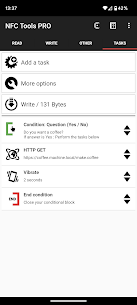
NFC Tools goes beyond basic writing by letting you assign tasks to a tag and automate routines you normally repeat every day. For example, when you tap a bedside NFC tag, your phone can switch to silent mode, adjust volume, enable Bluetooth, and set an alarm for the morning—automatically. With 200+ available actions and unlimited combinations, you can build automations for home, work, the car, or the gym.
Read Tab: See Detailed Tag Information
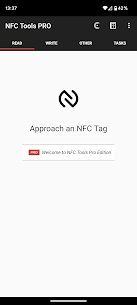
When you scan a tag in the Read section, NFC Tools shows technical and practical details, including the manufacturer and tag type (such as NTAG or Mifare families), the tag serial number, supported NFC technologies and standards (like NFC-A or NFC Forum types), memory size, whether the tag is writable or locked, and the full content stored on the tag (NDEF records).
Write Tab: Add Text, Links, Contacts, and Settings
In the Write section, you can record many types of data: plain text, URLs to websites or videos, social or app links, emails, phone numbers, prewritten SMS messages, contact cards (including emergency contacts), addresses and geolocation, and even Wi‑Fi or Bluetooth configurations. You can also write multiple records to one tag, which helps you store larger sets of information in a single tap.
Other Tools: Copy, Erase, and Protect Tags
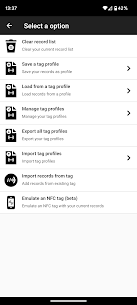
NFC Tools includes extra utilities under the Other tab. You can copy tags, wipe them clean, and add password protection when your tag and chip type support it.
Tasks Tab: Examples of Automations You Can Build
The app groups actions into categories so you can build routines quickly. You can toggle Bluetooth, switch sound modes (silent/vibrate/normal), change screen brightness, set alarm/notification/ring volumes, start timers or alarms, add calendar events, open apps or URLs, send texts or dial numbers, read text aloud with text-to-speech, and configure Wi‑Fi—plus many more actions.
Tag Compatibility: Widely Tested NFC Chips
NFC Tools works with a wide range of popular tags, including many NTAG models (203, 210/210u, 212, 213 variants, 215, 216, 413/424 DNA), Ultralight lines (Ultralight, C, EV1), ICODE SLI families (SLI, SLI-S, SLIX variants, SLIX2, DNA), DESFire ranges (EV1/EV2/EV3, LIGHT), ST25 series (ST25TV, ST25TA, STLRI2K), and other common formats such as Mifare Classic, Felica, Topaz, and EM4x3x.
What's new
We work hard to provide you with a quality app, but you may run into problems we couldn't anticipate. If so, don't panic, keep calm and feel free to contact us at apps [at] wakdev.com
Release notes : http://release-notes.nfctools.wakdev.com
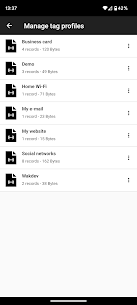
Images

Download links
How to install NFC Tools - Pro Edition Mod APK?
1. Tap the downloaded NFC Tools - Pro Edition Mod APK file.
2. Touch install.
3. Follow the steps on the screen.
Note: Important!
- Delete all previous Original/Mod before installing the latest mod.
- If necessary, log in with your email/social media. Modded App cannot be logged in with Gmail.
- Enjoy !!!
Related apps





Latest Apps
Popular apps


