
Photo Mate R3
How to install Photo Mate R3 Mod APK?
1. Tap the downloaded Photo Mate R3 Mod APK file.
2. Touch install.
3. Follow the steps on the screen.
Note: Important!
- Delete all previous Original/Mod before installing the latest mod.
- If necessary, log in with your email/social media. Modded App cannot be logged in with Gmail.
- Enjoy !!!
Mod Info:
- Subscription / Paid features unlocked;
- Disabled / Removed unwanted Permissions + Receivers + Providers + Services;
- Optimized and zipaligned graphics and cleaned resources for fast load;
- Ads Permissions / Services / Providers removed from AndroidManifest;
- Google Play Store install package check disabled;
- Debug code removed;
- Remove default .source tags name of the corresponding java files;
- Languages: Full Multi Languages;
- CPUs: armeabi-v7a, arm64-v8a, x86, x86_64;
- Screen DPIs: 160dpi, 240dpi, 320dpi, 480dpi, 640dpi;
- Original package signature changed;
Description
Photo Mate gives you a complete image workflow on Android: you can catalog photos, browse them with full shooting data, and edit RAW or JPG files without permanently changing the originals. The app works as an organizer, a viewer, and a non-destructive developer, so you can manage large photo collections and refine images directly on your device.
Organize Your Photos with Metadata and Custom Tags
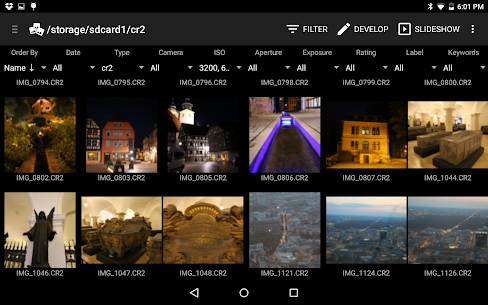
Photo Mate builds a photo library that lets you sort and filter images using camera metadata such as camera model, aperture, shutter settings, or ISO. You can also add your own ratings, color labels, and keywords to keep projects consistent. The library supports JPG and a wide range of camera RAW formats, and it writes universal XMP sidecar files so your ratings and tags stay compatible with many desktop editors. You can also edit IPTC fields like title and description to keep professional information attached to each photo.
View Images with EXIF Details and Side-by-Side Comparison
Photo Mate displays your photos alongside important EXIF information, including exposure settings and other capture details. The app also lets you compare images next to each other and rate them while you review, which makes it easier to select the strongest shots from a burst or a full session. It supports common formats such as JPG, PNG, and PSD, plus many RAW types including Canon (CR2/CRW), Nikon (NEF), Sony (ARW), Adobe DNG, Panasonic (RW2), Olympus (ORF), and more.
Develop and Edit RAW Files Non-Destructively
Photo Mate edits photos in a non-destructive way, so you can adjust your images while keeping the original file untouched. You can decode and process RAW files to control white balance and exposure accurately, and you can also post-process JPG images with the same toolset. The editor includes core adjustments like exposure, contrast, highlights/lights, shadows, clarity, and vibrance. You can correct lens issues with lens-based tools and an included lens collection that helps remove distortion, vignetting, and chromatic aberration automatically. When you need finer control, you can use curves and layer-based edits such as gradients, brush work, lasso selections, and threshold-based adjustments.
Extra Workflow Tools for Real Projects
Photo Mate adds practical features beyond editing: you can print images, import photos directly from a camera, access files over a network, stack or combine shots, and run batch conversion or batch edits to speed up repetitive work across many photos.
Learn More and Explore Advanced Features
If you want a mobile setup that behaves more like a desktop photo manager, Photo Mate gives you the tools to organize, evaluate, and refine images in one place while keeping your edits flexible and reversible.
What's new
New mobile editor: simpler, faster, more room for your image. Switch between mobile and full layout anytime — non-destructive edits stay in sync. Improved crop and curves on mobile too.
New Ultra denoising uses GPU compute for cleaner results on high luma/chroma noise,
Improve stacking & stability fixes
Device library access: browse, sort, and filter your photos directly
QoL: GPU-accelerated editing previews, swipe left/right in Develop to switch images, plus layout polish.
Images


Download links
How to install Photo Mate R3 Mod APK?
1. Tap the downloaded Photo Mate R3 Mod APK file.
2. Touch install.
3. Follow the steps on the screen.
Note: Important!
- Delete all previous Original/Mod before installing the latest mod.
- If necessary, log in with your email/social media. Modded App cannot be logged in with Gmail.
- Enjoy !!!
Related apps





Video
Latest Apps
Popular apps


