
Reminder Pro
How to install Reminder Pro Mod APK?
1. Tap the downloaded Reminder Pro Mod APK file.
2. Touch install.
3. Follow the steps on the screen.
Note: Important!
- Delete all previous Original/Mod before installing the latest mod.
- If necessary, log in with your email/social media. Modded App cannot be logged in with Gmail.
- Enjoy !!!
Mod Info:
- No root or Lucky Patcher or Google Play Modded required;
- Disabled / Removed unwanted Permissions + Receivers + Providers + Services;
- Optimized and zipaligned graphics and cleaned resources for fast load;
- Google Play Store install package check disabled;
- Remove default .source tags name of the corresponding java files;
- Debug code removed;
- Languages: Full Multi Languages;
- CPUs: universal architecture;
- Screen DPIs: 160dpi, 240dpi, 320dpi, 480dpi, 640dpi;
- Original package signature changed;
Description
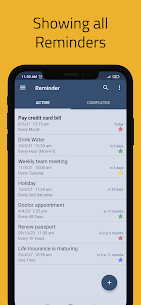
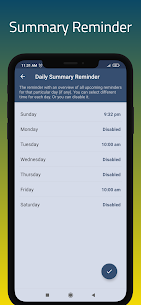
Reminder Pro gives you a clean reminder app with zero advertisements. You can create fast popup reminders for one-time tasks, recurring routines, and deadline alerts without digging through complicated menus. The app keeps everything simple, so you spend seconds setting a reminder and then rely on timely notifications to keep you on track.
Simple Setup for One-Time and Recurring Tasks
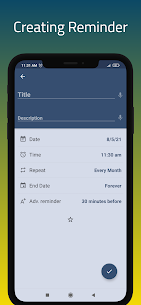
You can add a reminder or deadline notification for almost anything—an errand, a habit, or a future event. Reminder Pro focuses on essential tools only, so you don’t waste time learning extra features you don’t need. You set the date and time, add notes if necessary, and let the app notify you at the right moment.
Built for Everyday Productivity
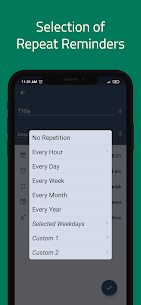
Reminder Pro works as a flexible organizer for daily life. You can use it as a medication reminder, an appointment alert, a weekly schedule helper, or a recurring task tracker. The app helps you clear mental clutter by moving important tasks into a dependable notification system.
Popular Ways People Use Reminder Pro
Deadline Notifications
You can enter school, work, or personal deadlines and receive alerts before they slip past you.
Homework and Assignments
You can set popup reminders for due dates and keep your study workload organized.
Meetings and Work Schedules
You can schedule reminders for meetings throughout the week and rely on automatic alerts when it’s time to attend.
Daily Tasks and Habit Routines
You can assign a time to everyday tasks and repeat them on a schedule. This works well for routines you want to maintain consistently, such as regular water intake.
Birthdays and Anniversaries
You can set reminders for birthdays and important dates so you remember to reach out on time. You can also attach notes for plans, gift ideas, or dinner reservations.
Errands and To-Do Lists
You can plan errands by setting a date, time, and detailed notes, then complete your to-do list with less stress and fewer forgotten items.
Important Calls
You can schedule call reminders and store helpful notes like names, numbers, and discussion points.
Bill Payments
You can avoid late fees by setting an alarm-style reminder for each bill and paying on schedule.
Medication and Pill Reminders
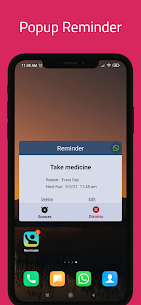
You can set a daily reminder to take medication, so you don’t rely on memory alone.
Event Planning
You can plan upcoming events in advance and use reminders to manage prep tasks step by step.
What's new
1. Overdue Flagging:
Introduced a toggle to enable or disable overdue flags based on your preference.
2. Wearable Snooze:
Refined the snooze function for wearables; the device now automatically applies the default duration configured in your settings.
Images
Download links
How to install Reminder Pro Mod APK?
1. Tap the downloaded Reminder Pro Mod APK file.
2. Touch install.
3. Follow the steps on the screen.
Note: Important!
- Delete all previous Original/Mod before installing the latest mod.
- If necessary, log in with your email/social media. Modded App cannot be logged in with Gmail.
- Enjoy !!!
Related apps




Video
Latest Apps
Popular apps


