
Rocks Player
ASD Dev Video Player for All Format
40 MB
12.1.420
6.0
100,000,000+

Mod Info
- Premium / Paid Features Unlocked
- Graphics & Resources Optimized
- Install Referrer Tracking Disabled
- Ads links removed and invokes methods nullified
- Advertising & Billing Activities Disabled
- Debug code removed
- Removed default .source tags name of the corresponding java files
- Removed All Unnecessary Files
- Languages: Full Multi Languages
- CPUs: Arm64-v8a Architecture
Description

Rocks Player is a powerful all-in-one video and music player for Android that supports all formats, including HD, Full HD, and 4K, with advanced playback controls, file management, and built-in downloader features.
Powerful All-in-One Video Player
Rocks Player delivers a complete multimedia experience by supporting a wide range of formats such as MP3, MP4, MOV, and many others. It allows users to play both videos and audio files seamlessly while providing an intuitive interface to manage media content efficiently. The app focuses on delivering smooth playback performance, making it suitable for everyday entertainment needs.
Advanced HD and 4K Playback Support
Rocks Player handles high-quality video formats with ease, including HD, Full HD, Ultra HD, and even 4K resolution. It uses optimized decoding technology to ensure videos run smoothly without lag. Whether you are watching movies or short clips, the player maintains consistent performance and clarity across all formats.
Smart Playback and Multitasking Features
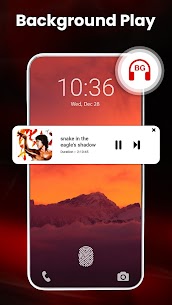
This video player enhances user experience with flexible playback options. You can play videos in the background like music, allowing multitasking while listening to audio. The floating player mode enables you to watch videos in a small window while using other apps. Additionally, split-screen support makes multitasking even more efficient.
Built-in Downloader and Media Tools
Rocks Player integrates a built-in video downloader and media tools, making it more than just a player. You can download videos directly, manage playlists, and organize files without switching apps. It also includes features like duplicate file detection, media scanning, and a secure vault to hide private videos and photos.
Complete File Management System
The app includes a powerful file manager that automatically scans your device and SD card to identify all media files. Users can easily browse, search, and organize videos, songs, and photos. Features like playlist creation, recently played tracking, and resume playback ensure a smooth and personalized experience.
Enhanced Viewing and Audio Controls
Rocks Player offers advanced controls such as playback speed adjustment, dual audio support, and subtitle integration. Smart gestures allow quick control of brightness, volume, and playback progress. The built-in equalizer with bass boost and virtualizer enhances audio quality, providing a richer listening experience.
Privacy, Security, and Customization
To protect user privacy, Rocks Player includes a video locker and gallery vault for securing personal files. It also allows file encryption and PIN protection. The app provides multiple themes, including dark mode and gradient designs, ensuring a visually appealing interface while reducing eye strain during night use.
Conclusion
Rocks Player stands out as a feature-rich multimedia solution for Android users who want more than just a basic video player. It combines powerful playback capabilities, smart multitasking features, and comprehensive file management into a single app. With its ability to support all formats, high-quality playback, and built-in tools, Rocks Player delivers a complete and efficient media experience.
Images


Download links
How to install Rocks Player Mod APK?
1. Tap the downloaded Rocks Player Mod APK file.
2. Touch install.
3. Follow the steps on the screen.
Note: Important!
- Delete all previous Original/Mod before installing the latest mod.
- If necessary, log in with your email/social media. Modded App cannot be logged in with Gmail.
- Enjoy !!!
Related apps






Latest Apps
Popular apps


