
Stopwatch Timer

Mod Info:
- Premium / Paid features unlocked;
- Disabled / Removed unwanted Permissions + Receivers + Providers + Services;
- Optimized and zipaligned graphics and cleaned resources for fast load;
- Ads Permissions / Services / Providers removed from AndroidManifest;
- Ads links removed and invokes methods nullified;
- Ads layouts visibility disabled;
- Google Play Store install package check disabled;
- Debug code removed;
- Remove default .source tags name of the corresponding java files;
- Analytics / Crashlytics / Firebase disabled;
- No active trackers or advertisements – offline mode;
- Languages: Full Multi Languages;
- CPUs: universal architecture;
- Screen DPIs: 160dpi, 240dpi, 320dpi, 480dpi, 640dpi;
- Original package signature changed;
Description
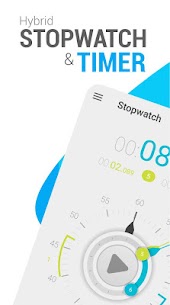
Hybrid Stopwatch and Timer gives you a clean, accurate way to measure time in almost any situation—sports training, cooking, classroom activities, board games, workouts, or presentations. The app combines a classic stopwatch (chronometer) with a flexible countdown timer, so you don’t need separate tools. It also keeps controls simple and places buttons so you can operate the app comfortably with one hand.
Stopwatch (Chronometer) Mode: Start, Stop, Lap, Reset
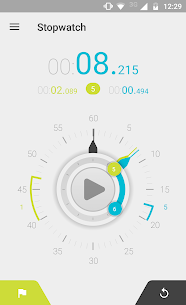
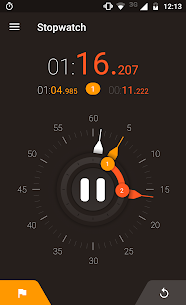
In stopwatch mode, you start and stop timing by tapping the main center button. The app shows elapsed time in two ways at once: a clear digital readout at the top and an analog dial that looks like a traditional stopwatch. When you record a lap, you tap the left button and the app adds a lap hand to the analog view, so you can visually compare lap positions. When you finish, you tap the right button to reset and prepare for a new session.
Lap List: View, Save, and Share Results
You can open the lap list from the top dropdown menu or by swiping left. The app lets you switch between viewing each lap’s individual time or the total accumulated time. You can also save your lap list to the SD card, share it on social platforms, or send it by email—useful for coaches, students, runners, or anyone who needs a record of timed intervals.
Countdown Timer Mode: Quick Setup with Hands or Input
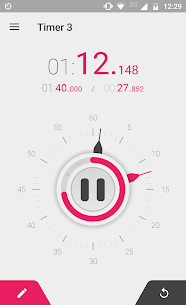
In countdown timer mode, you set time quickly by dragging the minute and second hands, which feels fast and intuitive. If you prefer a classic setup, you can enter time using the input method accessed from the left button. To reset, you press the right button: one tap restores your last-used countdown time, while a long press clears the timer back to zero. The app also uses a circular progress arc to help you see remaining time at a glance, which makes it easier to pace yourself during cooking, study sessions, or workouts.
Timer Alarm: Choose Vibration, Sound, and Duration
When the countdown ends, the app triggers an alarm that you can tailor to your environment. You can enable vibration, choose a custom sound, and set how long the alarm lasts—from a short 2 seconds up to 30 minutes. This flexibility helps when you need a brief alert for quick tasks or a longer alarm for situations where you might step away from the phone.
Timer Presets: Store Your Most-Used Countdowns
The app includes timer presets so you can reuse common countdowns without setting them again and again. You access presets from the top dropdown menu or by swiping left, then you create, edit, and organize timers for routines like 5-minute breaks, 25-minute focus sessions, or specific cooking steps.
Physical Button Control: Use Volume Keys for Timing
Hybrid Stopwatch and Timer can respond to the phone’s Volume Up and Volume Down buttons, giving you a hands-on control option when tapping the screen feels inconvenient (for example, during workouts). You enable this feature from the preferences screen.
Design and Themes: Classic Stopwatch Feel on Your Screen
The app designs its interface to feel like a real stopwatch and timer in your hand. It uses smooth animations and offers 12 themes, including clean Holo-style Android looks and retro-inspired styles. It also supports multiple screen sizes so it stays readable on different devices.
Feature Summary
- Stopwatch and countdown timer in one app
- Digital + analog time display
- Unlimited laps
- Save laps to SD card and share via email/social
- Runs in the background
- 12 color themes and animations
- Custom timer alarm: duration, vibration, and sound
- Custom ringtones and multiple audio output types (Ringtone/Media/Alarm)
- Timer presets for quick access
- Optional volume-key controls
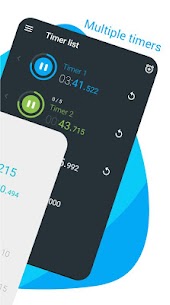
- Support for running multiple timers at the same time
Images
Download links
How to install Stopwatch Timer Mod APK?
1. Tap the downloaded Stopwatch Timer Mod APK file.
2. Touch install.
3. Follow the steps on the screen.
Note: Important!
- Delete all previous Original/Mod before installing the latest mod.
- If necessary, log in with your email/social media. Modded App cannot be logged in with Gmail.
- Enjoy !!!
Related apps





Most viewed apps
Most rated apps


