
Sygic GPS
How to install Sygic GPS Mod APK?
1. Tap the downloaded Sygic GPS Mod APK file.
2. Touch install.
3. Follow the steps on the screen.
Note: Important!
- Delete all previous Original/Mod before installing the latest mod.
- If necessary, log in with your email/social media. Modded App cannot be logged in with Gmail.
- Enjoy !!!
Mod Info
Paid Features Unlocked
● No ads
● Stable mod
● Debug info removed
● Multiple languages available
● All premium features are working
● No active trackers or advertisements
● Requires android 8.0 and up
● CPUs arch: arm64-v8a
● Optimized and cleaned resources for fast loading.
Description
Sygic GPS Navigation & Maps is a powerful offline navigation app featuring 3D maps, live traffic updates, speed camera alerts, and advanced safety tools designed for smarter and safer driving worldwide.
Introduction
Reliable navigation is no longer a luxury but a necessity, especially for drivers who travel frequently, explore unfamiliar areas, or depend on precise directions in real time. Sygic GPS Navigation & Maps has positioned itself as one of the most trusted GPS navigation applications in the world, with more than 200 million users relying on it for daily commuting and long-distance travel. What makes Sygic stand out is its ability to deliver accurate navigation even without an internet connection, supported by high-quality offline maps and continuously updated data.
Designed for drivers, pedestrians, and travelers alike, Sygic combines offline functionality with advanced real-time services such as traffic intelligence, speed camera alerts, and safety-focused driving assistance. The result is a navigation experience that balances performance, convenience, and reliability across a wide range of driving conditions.
Offline Maps Built for Global Navigation
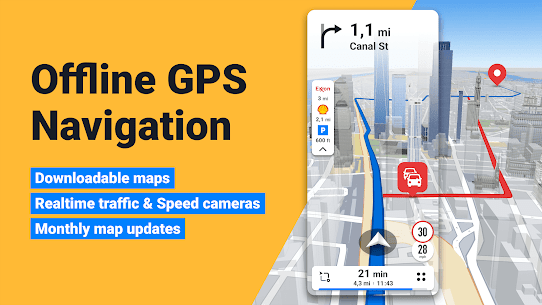
One of Sygic’s strongest advantages is its offline navigation capability. The app allows users to download detailed 3D maps of countries worldwide directly to their device. These maps are provided by trusted sources such as TomTom and other leading map providers, ensuring accuracy and consistency. Once downloaded, users can navigate without relying on mobile data or a stable internet connection, which is particularly useful when traveling abroad or driving through remote areas.
Sygic updates its maps multiple times per year at no extra cost. This ensures that road changes, new routes, and updated infrastructure are reflected in the navigation system. The offline maps include street names, route details, points of interest, and landmarks, providing a comprehensive navigation experience that does not degrade when connectivity is lost.
Precise Voice-Guided Navigation
Sygic delivers clear and reliable turn-by-turn navigation with voice guidance that includes spoken street names. This feature allows drivers to keep their eyes on the road while receiving precise instructions at every stage of the journey. The app supports lane guidance and dynamic rerouting, helping drivers stay on track even when unexpected turns or missed exits occur.
For pedestrians, Sygic also offers walking navigation with routes optimized for foot travel. Tourist attractions, landmarks, and nearby points of interest are integrated into the navigation system, making the app useful not only for drivers but also for travelers exploring new cities on foot.
Real-Time Traffic Intelligence
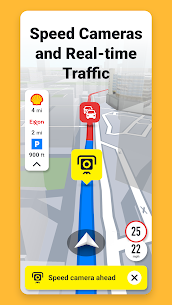
Traffic congestion can significantly impact travel time and fuel efficiency. Sygic addresses this challenge with real-time traffic information collected from hundreds of millions of users worldwide. The app continuously analyzes traffic conditions and adjusts routes accordingly to help drivers avoid congestion, road closures, and delays.
By combining offline maps with live traffic data, Sygic provides a balanced navigation experience. Drivers benefit from reliable routing even when offline, while real-time traffic data enhances route optimization when connectivity is available. This dual approach makes the app adaptable to a wide range of driving environments.
Android Auto Integration for Safer Driving
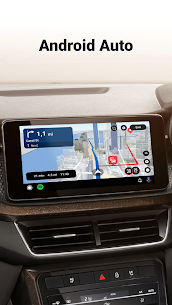
Sygic fully supports Android Auto, allowing drivers to project the navigation interface directly onto their car’s infotainment system. This integration enables hands-free interaction and reduces distractions while driving. Users can control navigation using their car’s touchscreen, buttons, or knobs, keeping the driving experience focused and intuitive.
The Android Auto interface is designed for clarity, with large icons and easy-to-read maps that improve visibility during both daytime and nighttime driving. This feature makes Sygic a strong choice for drivers who prioritize safety and convenience on the road.
Advanced Safety and Driver Assistance Features
Safety is a core focus of Sygic GPS Navigation & Maps. The app includes speed limit warnings that notify drivers of current speed limits and upcoming changes. This helps reduce the risk of speeding violations and promotes safer driving behavior.
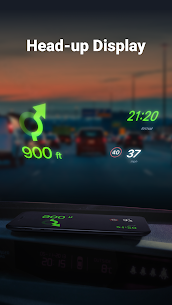
Dynamic Lane Assistant guides drivers into the correct lane well in advance of complex intersections or highway exits. This is particularly useful in unfamiliar areas where last-minute lane changes can be dangerous. The Head-up Display feature projects navigation information onto the windshield, reducing the need to look away from the road, especially during nighttime driving.
Sygic also incorporates sign recognition technology that detects speed limits from traffic signs in real time. Combined with dashcam functionality that records the road ahead and automatically saves footage in case of an accident, the app provides an added layer of security and documentation for drivers.
Innovative Navigation Enhancements
Sygic continues to push innovation with features such as Real View Navigation, which uses augmented reality to overlay navigation instructions onto real-world imagery. This feature enhances situational awareness and makes complex navigation scenarios easier to understand.
The Cockpit feature displays real-time vehicle performance data, offering insights into driving behavior and efficiency. Real-time route sharing allows users to share their current location and estimated time of arrival with others, improving coordination and peace of mind during trips.
In partnership with Bosch, Sygic also offers wrong-way warnings. This system alerts drivers if they are traveling in the wrong direction or if another vehicle is approaching in the opposite direction, adding an important safety mechanism in high-risk situations.
Cost-Saving Tools Along the Route
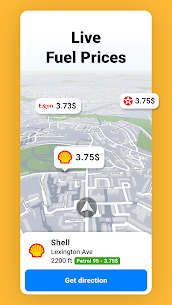
Beyond navigation and safety, Sygic helps drivers save money during their journeys. The app provides parking suggestions with live information on pricing and availability, reducing the time and fuel spent searching for parking spots. Drivers can also set their fuel type and receive live updates on fuel prices along their route, helping them choose the most cost-effective refueling options.
Speed camera alerts help drivers avoid costly fines, while offline maps eliminate roaming charges when traveling internationally. These practical features make Sygic not only a navigation tool but also a smart companion for cost-conscious drivers.
Conclusion
Sygic GPS Navigation & Maps offers a comprehensive navigation solution that combines offline reliability with real-time intelligence. Its high-quality 3D maps, frequent updates, and advanced safety features make it suitable for everyday commuting, long road trips, and international travel. By integrating traffic data, driver assistance tools, and cost-saving features into a single platform, Sygic delivers a navigation experience that is both powerful and user-focused.
For drivers seeking dependable navigation without constant internet access, along with modern safety and convenience features, Sygic stands as a strong and trusted choice in the GPS navigation landscape.
Frequently Asked Questions
Is Sygic GPS Navigation usable without an internet connection?
Yes, Sygic allows users to download offline maps, enabling full GPS navigation without an active internet connection.
How often are maps updated in Sygic?
Maps are updated multiple times per year for free, ensuring users have access to the latest road and route information.
Does Sygic support Android Auto?
Yes, Sygic integrates with Android Auto, allowing navigation to be displayed and controlled through the car’s infotainment system.
Does Sygic provide real-time traffic updates?
Yes, when connected to the internet, Sygic offers real-time traffic information based on data collected from millions of users worldwide.
Are safety features included in Sygic?
Sygic includes a wide range of safety features such as speed limit warnings, lane assistance, dashcam recording, and wrong-way alerts.
What's new
We’ve added a new Custom UI setting that lets you personalize the app’s look with customizable colors, themes, and skins, introduced a Route Progress Bar for Android Auto, added a new setting for the report button in Android Auto, and included several other improvements and bug fixes to make everything run smoother.
Images
Download links
How to install Sygic GPS Mod APK?
1. Tap the downloaded Sygic GPS Mod APK file.
2. Touch install.
3. Follow the steps on the screen.
Note: Important!
- Delete all previous Original/Mod before installing the latest mod.
- If necessary, log in with your email/social media. Modded App cannot be logged in with Gmail.
- Enjoy !!!
Related apps




Developer's apps
Most viewed apps
Most rated apps


