
VidCompact
34 MB
4.0.1.0
5.0
10,000,000+

Mod Info
- VIP / Paid Features Unlocked
- AOSP Compatible / No Google
- CPUs: arm64-v8a, armeabi-v7a
- Full Multi Languages
- All debug Info Removed
Description
VidCompact stands out as a versatile, free Android app that transforms videos and audio with ease, supporting a wide array of formats while offering robust editing tools. Discover VidCompact, the ultimate free Android video converter, compressor, trimmer, and editor—convert to MP4, compress files without quality loss, trim clips, and more for seamless multimedia management on your device.
VidCompact empowers Android users with a comprehensive suite of tools designed for video and audio handling. Developers crafted this app to tackle common pain points like bulky files eating up storage space and the need for quick format changes. It handles nearly every popular video and audio format you encounter, from high-definition clips to standard ones. Users love how it converts footage into formats like MP4, MOV, or even GIFs, all while preserving crisp quality. Beyond basic conversion, the app packs in editing powerhouses such as merging clips, trimming lengths, cutting precise segments, reversing playback, stabilizing shaky shots, applying slow-motion effects, cropping frames, and rotating videos. This all-in-one approach saves time and keeps everything on your device—no need for a computer or clunky online services.
Core Conversion Capabilities
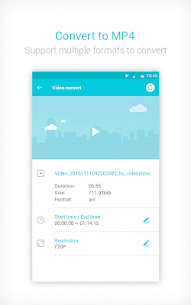
Users activate VidCompact’s conversion engine with just a few taps, turning raw videos into polished files ready for any platform. The app swiftly processes HD videos, HTML5 content, WMV, MKV, FLV, AVI, MP4, and MOV formats into your preferred output. Imagine you shot a 4K family vacation video in MKV—VidCompact converts it to lightweight MP4 without a hitch, maintaining every detail. It also excels at creating GIFs from key moments, perfect for social media shares. What sets it apart? The one-step process: select your file, choose the format, and hit convert. This efficiency works across almost all Android devices, ensuring broad compatibility whether you’re on a budget phone or a flagship model.
Powerful Video Compression Features
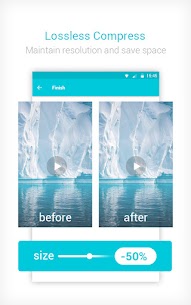
Storage woes vanish as VidCompact compresses videos dramatically while upholding quality and resolution. It zips massive clips down to tiny sizes, freeing gigabytes on your device—think reducing a 1GB hour-long video to under 200MB without blurring faces or muddying audio. The app intelligently analyzes files to shrink them optimally, and there’s no time limit on processing, so even lengthy recordings compress smoothly. Users report saving hours of footage post-compression, ideal for travelers or content creators juggling limited space. Plus, it doubles as an online-style audio compressor, slimming soundtracks effortlessly to keep your library lean.
Essential Video Editing Tools
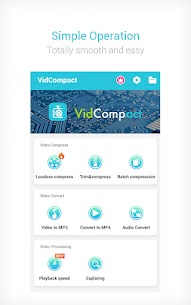
Edit like a pro directly on your phone with VidCompact’s intuitive toolkit. Crop out unwanted edges, trim excess footage, or cut specific sections by dragging sliders—precision meets simplicity. Play back clips instantly, rename them for organization, or delete duds in seconds. Adjust audio frequencies to fine-tune sound, speed up action sequences, or slow them down for dramatic effect. Rotate videos to fix sideways smartphone shots, and stabilize footage from bumpy runs or car rides. These features flow seamlessly, letting you craft professional-looking edits without exporting to other apps.
Dedicated Video to MP3 Converter
Extract audio gold from your videos using VidCompact’s robust MP3 converter. It serves as a clip converter for short snippets, HD video converter for premium sources, online video converter alternative (fully offline), general audio converter, and dedicated MP3 maker. Pull crystal-clear soundtracks from any supported format, ready for music players or podcasts. The process stays lossless, so your favorite concert recording retains its punch even after extraction.
Advanced Audio Editing Options
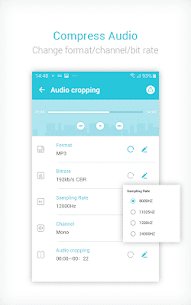
Audio enthusiasts rejoice—VidCompact compresses tracks easily, tweaks bit rates for smaller files, edits channels (like isolating stereo left or right), and trims clips without quality dips. Change playback speeds or frequencies to remix podcasts or voiceovers. This flexibility shines for musicians remastering demos or podcasters prepping episodes, all while keeping files compact and high-fidelity.
About the Video Converter Engine
Dive deeper into VidCompact’s converter, which outputs HD-quality MP4, MOV, or GIF files from inputs like AVI, MKV, FLV, RMVB, 3GP, MPEG, WMV, and MOV. Explore format galleries for niche options, and select resolutions from 480p to 4K effortlessly. Extract segments by pinpointing start and end times—great for highlighting a soccer goal from a full match. Its pro-level simplicity makes it a free powerhouse, rivaling paid desktop software.
Video Speed Changer Tools
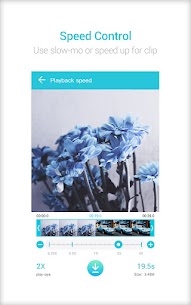
Control pacing with precision: ramp up playback to 4x for quick reviews or dial down to 0.25x for buttery slow motion. Convert fast-motion hype reels or dreamy slow-mo clips, then save them losslessly. Runners analyze form at half-speed, while filmmakers experiment with time effects—all without quality trade-offs.
Additional Standout Advantages
VidCompact boasts a clean, fresh interface reminiscent of top VideoShow apps—simple navigation keeps beginners editing in minutes. Access every feature without hidden fees, a rarity in app stores. It supports over 30 languages and 200+ Android devices, making it globally accessible from Indonesia to the US. Multilingual menus and device optimization ensure smooth performance everywhere.
Why Choose VidCompact as Your Go-To Tool
Professionals and casual users alike pick VidCompact for its speed—conversions finish in moments. It crops, trims, cuts, and compresses without quality loss, no matter the file size. Free up memory effortlessly, with no caps on video length. Download it today from the Google Play Store, and watch your device breathe easier as you convert, edit, and store more content than ever.
Images
Download links
How to install VidCompact Mod APK?
1. Tap the downloaded VidCompact Mod APK file.
2. Touch install.
3. Follow the steps on the screen.
Note: Important!
- Delete all previous Original/Mod before installing the latest mod.
- If necessary, log in with your email/social media. Modded App cannot be logged in with Gmail.
- Enjoy !!!
Related apps





Developer's apps



Most viewed apps
Most rated apps


