
VivaCut
How to install VivaCut Mod APK?
1. Tap the downloaded VivaCut Mod APK file.
2. Touch install.
3. Follow the steps on the screen.
Note: Important!
- Delete all previous Original/Mod before installing the latest mod.
- If necessary, log in with your email/social media. Modded App cannot be logged in with Gmail.
- Enjoy !!!
Mod Info
● Pro | Paid Features Unlocked
● No ads
● Stable mod
● No watermark
● Unlock exclusive features
● 4K export, hsl, aI face, face stickers body effects, video effects
● Multiple languages available
● CPUs arch: armeabi-v7a, arm64-v8a
● No active trackers or advertisements
● Optimized and cleaned resources for fast loading.
Description
Create stunning, cinematic videos effortlessly with VivaCut AI Video Editor. Enjoy powerful AI tools, professional editing features, and easy-to-use templates for high-quality content creation.
Introduction to VivaCut AI Video Editor
VivaCut – AI Video Editor & Film Maker delivers a powerful, professional-level video editing experience driven by advanced artificial intelligence. The app combines studio-quality tools, smart templates, and smooth export capabilities, allowing creators to produce cinematic videos, social media reels, and engaging vlogs with precision. Whether you aim to craft content for entertainment or professional use, VivaCut provides everything you need to achieve polished results quickly and efficiently.
Powerful AI Video Editing Tools
VivaCut integrates cutting-edge AI tools that simplify complex editing tasks while enhancing creativity. The AI auto captions feature instantly converts speech into accurate text, making videos more accessible and engaging. Dynamic captions add stylish animations that capture viewer attention, while the image-to-video function transforms static photos into lively clips using effects like AI hug, kiss, or motion-based animations.
The platform also offers exclusive video templates that allow users to create viral-style content in just one tap. Its AI remover tool efficiently eliminates unwanted objects from footage, ensuring clean visuals. Additionally, the AI enhancer upgrades both videos and images to high-definition quality, improving clarity with minimal effort. Smooth slow-motion functionality further elevates storytelling by adding cinematic depth to scenes.
Beginner-Friendly Editing Experience
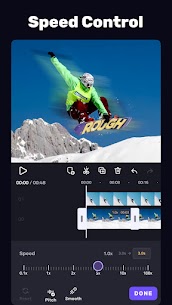
VivaCut ensures that even first-time users can edit videos with ease. It includes essential tools such as trimming, cutting, splitting, and merging clips without compromising quality. Users can control playback speed with customizable curves, allowing for creative pacing and dramatic effects.
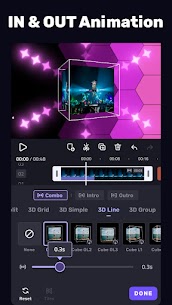
The editor provides a variety of transitions and visual effects to enhance storytelling. Text customization options, including diverse fonts and styles, help personalize titles and captions. Stickers and emojis add a playful touch, while color adjustment tools enable precise control over brightness, contrast, and saturation, ensuring visually appealing results.
Advanced Features for Professional Creators
For experienced editors, VivaCut offers a comprehensive set of advanced tools. Keyframe editing allows precise animation control, enabling smooth transitions and motion effects. Users can apply slow-motion effects selectively to highlight specific moments in a video.
The chromakey feature supports green screen editing, making it easy to create immersive backgrounds. Masking tools provide multiple shape options for scene customization, while Picture-in-Picture (PIP) functionality enables layering of videos, images, and effects. The mosaic tool helps protect sensitive information by blurring or pixelating areas within a clip.
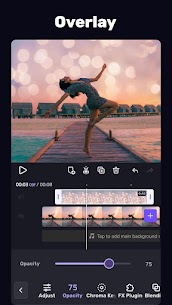
VivaCut also supports video blending with professional-grade modes such as Multiply, Screen, and Soft Light, allowing users to merge clips creatively. Overlay controls further enhance flexibility by adjusting opacity and blending for layered visuals.
Special Creative Features
The app includes additional features designed to expand creative possibilities. Its automatic caption generator produces accurate subtitles effortlessly, saving time during editing. The photo slideshow maker transforms image collections into dynamic video presentations with music, making it ideal for storytelling and social media content.
Trending Effects and Filters
VivaCut provides access to a wide range of modern effects and filters that enhance visual appeal. Users can apply styles such as Glitch, Retro DV, Fade, Blur, and 3D effects to create unique aesthetics. Cinematic filters and advanced color grading tools help achieve professional-level visuals that stand out across platforms.
Music and Sound Enhancement
Audio plays a crucial role in video quality, and VivaCut offers a rich library of music and sound effects to complement visuals. Users can extract audio directly from existing videos and incorporate it into new projects. These tools allow creators to build immersive content with synchronized sound and visuals, improving overall engagement.
Easy Export and Sharing Options
VivaCut simplifies the final stage of content creation with flexible export options. Users can render videos in Full HD 1080p or even 4K resolution, ensuring high-quality output. The app supports direct sharing to popular platforms like TikTok, YouTube, Instagram, Snapchat, and WhatsApp, making content distribution seamless and efficient.
Conclusion
VivaCut AI Video Editor stands out as a versatile and powerful editing solution for both beginners and professionals. By combining intuitive tools with advanced AI-driven features, it allows users to create visually stunning content without complexity. From quick social media clips to cinematic productions, VivaCut streamlines the entire editing process while maintaining high-quality results.
What's new
1.All brand new editing UI
2.Now,you can change language in settings
Images


Download links
How to install VivaCut Mod APK?
1. Tap the downloaded VivaCut Mod APK file.
2. Touch install.
3. Follow the steps on the screen.
Note: Important!
- Delete all previous Original/Mod before installing the latest mod.
- If necessary, log in with your email/social media. Modded App cannot be logged in with Gmail.
- Enjoy !!!
Related apps





Latest Apps
Popular apps


