
Your Calendar Widget
Manuel Shenavai
12.06 MB
1.70.9
Varies with device
500,000+

Mod Info:
- Pro / Paid features unlocked;
- Disabled / Removed unwanted Permissions + Receivers + Providers + Services;
- Optimized and zipaligned graphics and cleaned resources for fast load;
- Ads Permissions / Services / Providers removed from AndroidManifest;
- Ads links removed and invokes methods nullified;
- Ads layouts visibility disabled;
- Google Play Store install package check disabled;
- Debug code removed;
- Remove default .source tags name of the corresponding java files;
- Analytics / Crashlytics / Firebase disabled;
- Languages: Full Multi Languages;
- CPUs: universal architecture;
- Screen DPIs: 120dpi, 160dpi, 240dpi, 320dpi, 480dpi, 640dpi;
- Original package signature changed;
Description
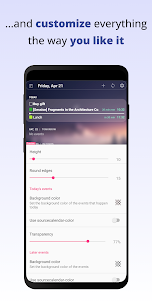
Your Calendar Widget helps you keep track of upcoming Google Calendar events directly from your home screen, lock screen, or notification panel. You can customize the widget to match your style and daily needs with ease. Each widget keeps its own separate settings, so you can create multiple widgets and give each one a different calendar source, layout, or appearance.
Main Features
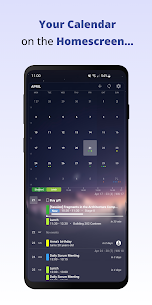
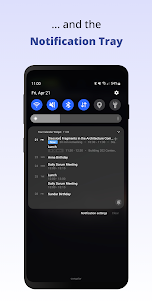
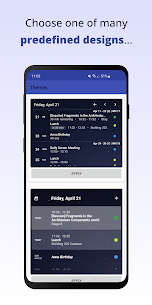
The widget offers flexible display options for different users and schedules. You can place it on the home screen, lock screen, or inside the notification bar for quick access. It supports agenda, inline agenda, and simple display modes, giving you several ways to view events. You can also improve event visibility by using timelines, badges, notifications, custom fonts, and background styles. The built-in month calendar lets you open a full monthly view without leaving the home screen. In addition, the widget can show birthdays and anniversaries from your contacts, filter events by title, and support multiple widgets with unique configurations. It also includes many ready-made themes created by both the system and the community.
Required Permissions
The widget needs a few permissions to work properly. It uses calendar access to read and display your events. It needs storage access to create and restore widget backups. On Android P and newer versions, it also uses storage permission to show your wallpaper in the widget preview. If you want birthday and anniversary details from your contacts, the app requires contact access. It also uses account information to display your task lists.
Task Integration
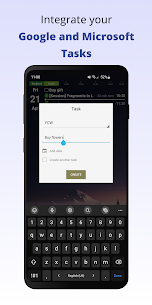
The task integration feature allows you to view and manage Google Tasks and Microsoft To Do items directly in the widget. You can create new tasks, mark current ones as complete, and keep track of subtasks as well. This makes the widget useful not only for event planning but also for everyday task management.
Google Reminders
The widget cannot display Google Reminders. Google does not provide a public API for accessing reminder data, so the widget cannot retrieve or show those reminders.
Microsoft Outlook Setup
If you want to display your Outlook calendar in the widget, you need to enable calendar sync in Outlook. First, open the Outlook app. Then go to Settings by tapping the Outlook icon in the top-left corner and the settings icon at the bottom. In the General section, open Calendar and turn on Sync Calendars. After that, open the Google Calendar app, go to Settings, select Manage Accounts, and enable the Outlook calendar.
Troubleshooting Widget Updates
If the widget does not update correctly or fails to show events, try a few simple fixes. Turn off battery-saving settings and restart your device. Then check whether your calendar sync works correctly in the Google Calendar app. You can also manually refresh calendar data by opening the Google Calendar app and selecting the Refresh option from the menu. Repeat the refresh several times if necessary.
Images
Download links
How to install Your Calendar Widget Mod APK?
1. Tap the downloaded Your Calendar Widget Mod APK file.
2. Touch install.
3. Follow the steps on the screen.
Note: Important!
- Delete all previous Original/Mod before installing the latest mod.
- If necessary, log in with your email/social media. Modded App cannot be logged in with Gmail.
- Enjoy !!!
Related apps




Latest Apps
Popular apps


