
YouTube ReVanced
How to install YouTube ReVanced Mod APK?
1. Tap the downloaded YouTube ReVanced Mod APK file.
2. Touch install.
3. Follow the steps on the screen.
Note: Important!
- Delete all previous Original/Mod before installing the latest mod.
- If necessary, log in with your email/social media. Modded App cannot be logged in with Gmail.
- Enjoy !!!
Mod Info
● Premium | Paid Features Unlocked 🥇
● No ads
● Stable mod
● Enabled volume & brightness swap controls
● Enabled minimized playback
background play
● Enabled open links directly on
external browser
● Enabled youtube dislike button
● Multiple languages available
● CPUs arch: Universal
~ How to Install
● First install Getmodpc Service
● Then install YouTube ReVanced
● Open YouTube ReVanced
● Log in to your Google account
Description
YouTube ReVanced Mod APK delivers a premium, ad-free YouTube experience with full features unlocked
YouTube ReVanced Mod APK is an enhanced version of the official YouTube app that offers a cleaner, smoother, and more customizable viewing experience. With premium features unlocked, you can enjoy videos without ads, play content in the background, and control how YouTube looks and behaves on your device.
Designed for users who want more freedom and fewer interruptions, YouTube ReVanced keeps everything you love about YouTube while removing its most frustrating limitations. The result is a faster, more enjoyable way to watch, listen, and explore content.
With the Mod APK version, you gain access to advanced features normally unavailable in the standard app, making daily viewing simpler and more flexible.
What is YouTube ReVanced Mod APK?
YouTube ReVanced Mod APK is the enhanced version of the official YouTube application, developed by the open-source community to improve user experience. It retains all core YouTube features while adding powerful tools such as ad-blocking, background playback, and extensive customization options.
The app is designed for users who want more control over how YouTube looks and functions. From interface elements to playback behavior, nearly every aspect can be adjusted to match personal preferences.
The Mod APK version unlocks premium-style features, allowing you to enjoy uninterrupted viewing and multitasking without restrictions.
Watch Videos Without Ads or Interruptions
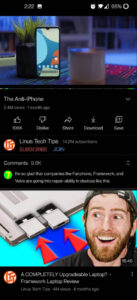
One of the biggest benefits of YouTube ReVanced is its ad-free experience. Videos play smoothly without pre-roll ads, mid-roll interruptions, or banner overlays. This creates a more immersive and relaxing viewing environment, especially for long videos, podcasts, and music sessions.
Background playback allows you to continue listening to videos while using other apps or when your screen is off. This feature transforms YouTube into a full multimedia platform for both video and audio content.
With premium features unlocked, you can enjoy YouTube the way it was always meant to be—simple, uninterrupted, and convenient.
Customize YouTube Your Way
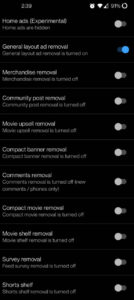
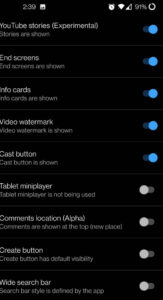
YouTube ReVanced gives you deep customization options that let you tailor the app to your personal preferences. You can adjust the layout, hide unnecessary interface elements, and switch between different themes to create a cleaner, more focused experience.
Swipe controls for brightness and volume make video playback smoother, especially when watching in full screen. You can also enable custom playback speeds and have the app remember your preferred speed for future videos.
These features combine to create a YouTube experience that feels faster, lighter, and more comfortable for everyday use.
Enhanced Playback and Smart Controls
Beyond removing ads, YouTube ReVanced improves how videos play. You can unlock higher video quality options, control playback speed more precisely, and minimize videos into picture-in-picture mode for multitasking.
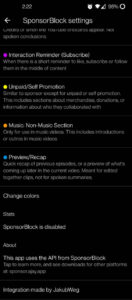
SponsorBlock integration allows you to automatically skip sponsored segments, intros, and outros, helping you reach the main content faster. This saves time and makes watching more efficient.
With the Mod Latest Version, these tools work seamlessly in the background, improving both performance and usability.
Why YouTube ReVanced Works So Well
YouTube ReVanced succeeds because it improves YouTube without changing what makes it great. The interface remains familiar, but the experience becomes smoother, faster, and more user-friendly.
Short viewing sessions become more enjoyable, while longer sessions feel less tiring without constant interruptions. The ability to customize the app ensures that every user can shape their experience exactly the way they prefer.
With premium features unlocked, the app becomes a powerful alternative to the standard YouTube experience.
Is YouTube ReVanced Mod APK Safe to Use?
Yes, YouTube ReVanced Mod APK is safe to use when downloaded from a trusted source like getmodpc. It does not require unnecessary permissions, and your personal data remains secure. Always use the latest version to ensure compatibility and stability.
Conclusion
YouTube ReVanced Mod APK offers a clean, flexible, and ad-free YouTube experience for Android users who want more control over their viewing habits. It removes ads, unlocks background playback, and adds powerful customization tools without changing the core YouTube interface.
With premium features unlocked and enhanced playback options, YouTube ReVanced becomes the ideal choice for anyone who wants to enjoy YouTube without limits. If you are looking for a YouTube ReVanced APK Mod download latest version, this app delivers a smoother and more enjoyable way to watch and listen.
FAQs
Q1: What is YouTube ReVanced Mod APK?
YouTube ReVanced Mod APK is a modified version of YouTube that unlocks premium features such as ad-free playback and background play.
Q2: Can YouTube ReVanced play videos in the background?
Yes, it supports background and minimized playback.
Q3: Does YouTube ReVanced remove ads completely?
Yes, all ads and sponsored interruptions are removed.
Q4: Is YouTube ReVanced Mod APK safe to use?
Yes, it is safe when downloaded from a reliable source such as getmodpc.
Q5: Does YouTube ReVanced Mod APK support customization?
Yes, it offers extensive UI and playback customization options.
Images

Download links
How to install YouTube ReVanced Mod APK?
1. Tap the downloaded YouTube ReVanced Mod APK file.
2. Touch install.
3. Follow the steps on the screen.
Note: Important!
- Delete all previous Original/Mod before installing the latest mod.
- If necessary, log in with your email/social media. Modded App cannot be logged in with Gmail.
- Enjoy !!!
Related apps





Developer's apps

Latest Apps
Popular apps


