
My Budget Book
How to install My Budget Book Mod APK?
1. Tap the downloaded My Budget Book Mod APK file.
2. Touch install.
3. Follow the steps on the screen.
Note: Important!
- Delete all previous Original/Mod before installing the latest mod.
- If necessary, log in with your email/social media. Modded App cannot be logged in with Gmail.
- Enjoy !!!
Description
My Budget Book helps you take charge of your finances by letting you quickly record every income and expense. You build a clear routine: you enter transactions as they happen, you review where your money goes, and you make better decisions with less guesswork.
Track Spending with One-Time and Recurring Transactions
You can log individual purchases and payments, or set up recurring entries for rent, subscriptions, salaries, and other repeating items. The app then helps you follow your cash flow over time, so you can track current balances and forecast future ones based on planned transactions.
See the Big Picture with Charts and Graphs
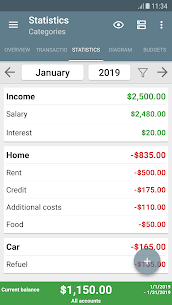
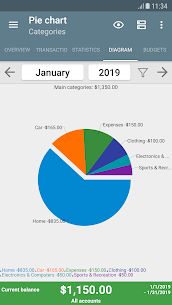
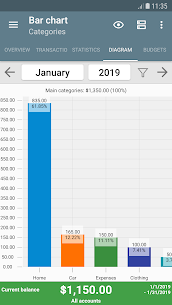
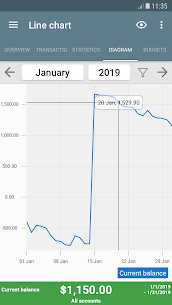
My Budget Book turns your records into visual insights. You can explore your finances through dynamic charts, graphs, and table views, which makes it easier to spot trends, compare categories, and understand how your income and expenses change month to month.
Budget Mode: Set Limits, Goals, and Rollover
Budget mode lets you set spending caps or saving goals for custom time periods. You can limit clothing purchases each month, set a weekly coffee budget, or create a biweekly savings goal for a vacation. You can also define budgets for credit cards or specific payment methods. If you enable rollover, the app carries over leftover amounts or deficits, so you always account for what you still owe or what you’ve saved.
Privacy First: Offline by Design
The app works offline and does not require Internet permission, which strengthens privacy and keeps your data on your device. When you want extra safety, you can still share backups to a cloud service yourself.
No Ads, No Hidden Costs
My Budget Book avoids advertising and surprise fees. You can use the app without forced purchases, and you only contribute through optional donations if you choose.
Customize the Interface and How You Review Data
You can personalize the Material Design layout and enable a configurable dark mode. The app also offers comprehensive views with handy tabs and many sorting options, so you can review transactions in the order that best matches your workflow.
Manage Accounts, Transfers, and Categories
You can create multiple accounts and move money between them using transfers. You can also customize categories and subcategories to match your real life, then sort and filter by categories, payment types, people, or groups for more detailed tracking.
Keep Proof and Stay on Schedule
You can attach photos and receipts to transactions to remember details and reduce paper clutter. You can also set reminders for upcoming payments, which helps you avoid missing due dates.
Match Your Pay Cycle and Reconcile with Statements
You can set the “start of the month” to fit your salary schedule (such as the 1st or the 15th). You can also reconcile entries against your bank statements to keep your records accurate.
Templates, Protection, Import/Export, and Backups
You can create templates to speed up transaction entry and protect sensitive data with an optional password or fingerprint lock. The app supports CSV import for existing data or bank statements, and it lets you export to HTML, Excel, or CSV so you can view or print your finances on a computer. Automatic local backups protect your data, and you can also create manual backups anytime.
Home Screen Widgets for Quick Access
Four widgets add convenience on your home screen, so you can check key information and access common actions faster without opening the full app.
What's new
Further adjustments to Android 16.
11 new CSV formats added.
All changes can be found in the "last changes" dialog.
If you have any questions, just send an email to [email protected] or use the integrated support function.
Images

Download links
How to install My Budget Book Mod APK?
1. Tap the downloaded My Budget Book Mod APK file.
2. Touch install.
3. Follow the steps on the screen.
Note: Important!
- Delete all previous Original/Mod before installing the latest mod.
- If necessary, log in with your email/social media. Modded App cannot be logged in with Gmail.
- Enjoy !!!
Related apps



Most viewed apps
Most rated apps


